
How Nubo Syncs Over Bluetooth: The Buttons, the Range, and the Caregiver Hub
You pressed a button on the Nubo device. Maybe the Sleep button at 3am. Maybe a Pee diaper change while half asleep. The tap took less than a second. Your phone was charging in the next room. And somehow, when you opened the app later, the event was there, timestamped to the second, synced to your partner’s phone too.
That is not magic. It is Bluetooth Low Energy, a small event queue, and a sync design built for how homes actually work: phones in different rooms, multiple caregivers coming and going, and nobody thinking about “connecting” anything.
What each button does
The Nubo device has nine buttons, each mapped to a specific baby care event. You press once. The event is queued. Here is the full map, including the multi-click behaviors that make the device more than a simple counter.
| Button | What one press logs | Extra behavior |
|---|---|---|
| Sleep | Baby fell asleep. Starts the sleep timer in the app. | Triple-click locks the device to prevent accidental presses. |
| Awake | Baby woke up. Ends the sleep timer. | Triple-click unlocks the device. |
| Left Breast | Starts a nursing timer on the left side. | Double-click stops the timer. If the right side was running, a single click on Left automatically stops Right first. |
| Right Breast | Starts a nursing timer on the right side. | Double-click stops the timer. If the left side was running, a single click on Right automatically stops Left first. |
| Formula | Logs a bottle feed. | Press multiple times to add volume. If your app is set to 1 oz per click, three presses logs 3 oz. |
| Pumped | Logs a pumped-milk feed. | Same multi-click as Formula. Each click adds one unit of the volume you set in the app. |
| Poop | Logs a dirty diaper. | Single tap. Done. |
| Pee | Logs a wet diaper. | Single tap. Done. |
| Assist | Starts Bluetooth advertising so a phone can find and pair with the device. | Long press puts the device into pairing mode for a new phone. |
The multi-click for Formula and Pumped is worth calling out because it turns a simple button into a quantity input. If you set the per-click value to 1 oz in the Nubo app, pressing Formula four times logs a 4 oz bottle. You can change that per-click value to match what you typically pour: 30 ml, 2 oz, whatever fits your routine. The device just counts clicks. The app does the math.
The nursing left/right auto-stop is another quiet design choice that matters at 2am. If you are nursing on the left side and switch to the right, pressing Right once stops the left timer and starts the right one. You do not need to double-click Left first, then press Right. One press handles the switch. Double-click a side when you are done and the timer stops.
Where the event goes: the sync explained
When you press a button, the device does not immediately shout the event into the air. It stores it in an internal queue that holds up to 1,024 events, then waits for a phone it knows to come within Bluetooth range.
When your phone, or your partner’s phone, or the nanny’s phone running the Nubo app enters range, the device and the phone authenticate each other automatically. No “connect” button, no Bluetooth settings menu, no pairing screen. The same cryptographic handshake that happened during initial setup happens again, silently, every time. Once authenticated, the device sends all queued events to the phone, one at a time, in the order they happened.
Each event carries two things: what button was pressed and a relative timestamp. The app converts that relative timestamp to an absolute wall-clock time using its own clock, so the event is stamped as “2:07 AM” even if the phone did not receive it until 7:30 AM. You never lose the actual moment the event happened.
If no phone is in range, the events stay queued. The device will periodically advertise itself so phones can find it: every 45 seconds at first, then backing off to every few minutes, then every five minutes for as long as events remain un-synced. The moment any paired phone comes home and walks within range, the queue drains.
The device has no Wi-Fi. No internet connection. No cloud ping. It speaks only Bluetooth to the phones it has been paired with. Your baby’s data never leaves your home through the device itself.
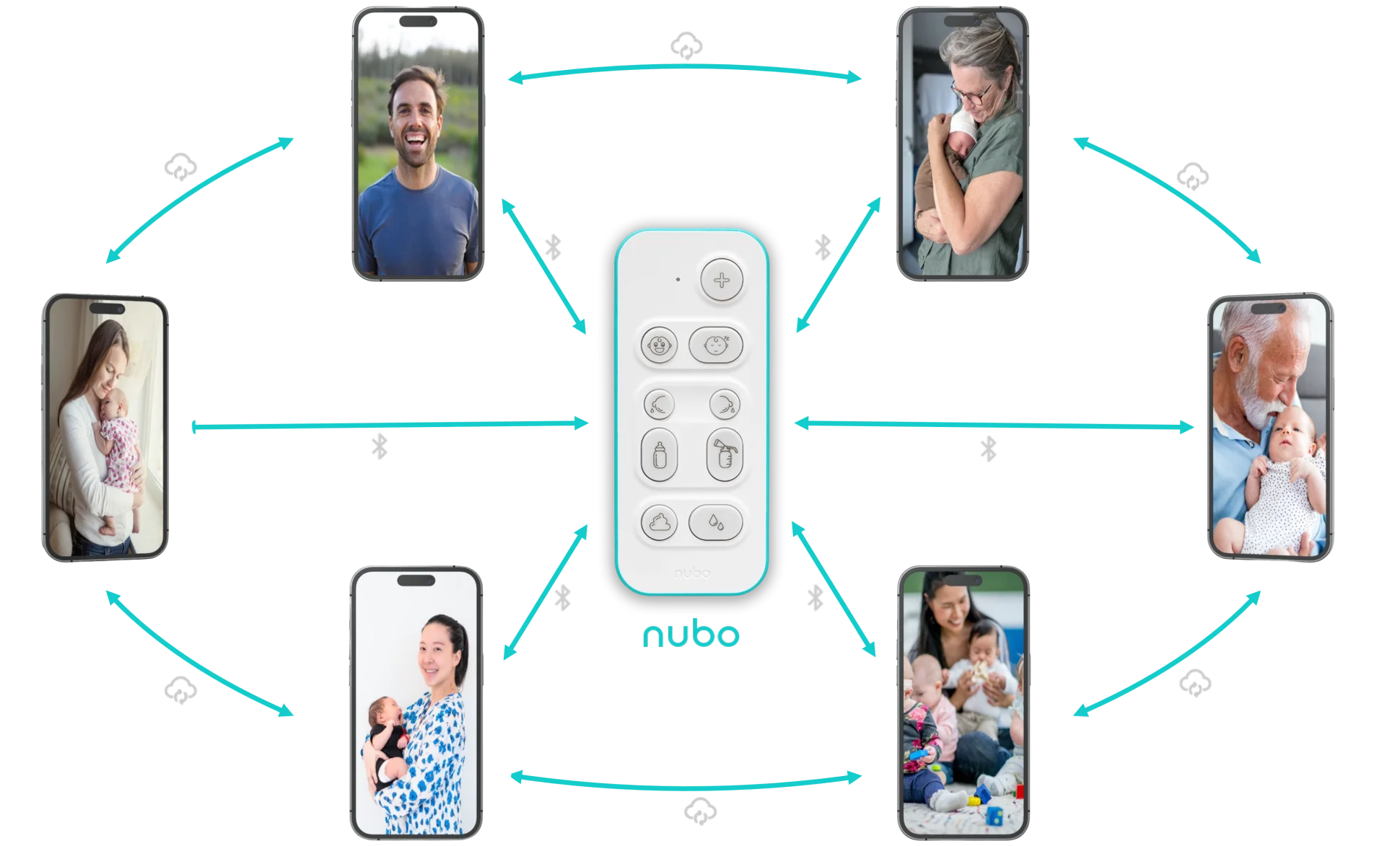
The caregiver hub: one device, many phones
The Nubo device can be paired with multiple phones. Mom’s phone. Dad’s phone. The nanny’s phone. Grandma’s phone. Any phone running the Nubo app that completed the initial pairing.
When the device has events to sync, whichever paired phone happens to be in Bluetooth range will collect them first. That phone then shares the events with every other caregiver through the app’s encrypted sync pipeline. Dad, at work, sees the nap Mom logged at home within seconds. The nanny, in the kitchen, sees the bottle Grandma logged in the nursery.
This is why we recommend pairing the device with every caregiver’s phone who regularly spends time near the baby. The more phones that can receive events, the shorter the window between a button press and a sync. If only Mom’s phone is paired and Mom is at the office, events queue until she returns. If Dad’s phone and the nanny’s phone are also paired, the device syncs to whoever is nearest, and everyone else gets the update through the app.
For more on how caregiver sharing works in practice, from QR-code invitations to real-time timelines, see our guide to nanny and grandparent tracking.
Real-world range: what 20 to 40 feet actually means
Bluetooth range in a real home is not a clean circle. The Nubo device uses Bluetooth Low Energy at a transmit power designed for reliable indoor coverage. In an open room with no walls, you can expect about 40 feet of range. Through one interior wall, about 30 feet. Through two walls, or a floor, closer to 20 feet.
In practice, this means the device on the nursery changing table reliably reaches a phone in the master bedroom next door, or a phone in the living room one wall away. It will probably not reach a phone in the basement if the device is on the second floor. That is fine. The events queue. The next time a paired phone walks past the nursery, the sync happens.
The range is short by design. Short-range Bluetooth means the device only talks to phones that are physically in your home. It cannot be reached from outside. It cannot be scanned by a neighbor’s phone. Pairing itself requires physical proximity: the device transmits at very low power during pairing to ensure only someone holding it can connect.
There is another reason Bluetooth Low Energy was the right choice, and it is the one you will appreciate after week three of newborn life: the device runs on a single CR2032 coin cell battery for months. No charging cable. No “did I plug it in?” anxiety at midnight. No adding yet another thing to the nightstand power strip that already services two phones, a baby monitor, and a white noise machine. BLE is efficient enough that the Nubo device sips from that tiny battery for months of daily use. When the battery eventually runs low, the app tells you. You swap in the spare coin cell that came in the box, and you are good for months more.
Why you want every caregiver’s phone paired
The math is simple. The more paired phones within Bluetooth range, the faster events sync.
If you are the only paired phone and you leave for work at 8 AM, the nanny’s button presses sit on the device until 6 PM. You come home, your phone connects, and 10 hours of events flood in at once. The timestamps are right. Nothing is lost. But you spent the day without visibility.
If the nanny’s phone is also paired, every button press syncs within seconds to her phone, then to yours through the app. You see feeds and diapers as they happen. The return-to-work handoff stops being a verbal debrief and becomes a live data stream.
Pairing a new phone takes under a minute. Open the Nubo app, scan the QR code from the primary parent’s sharing screen, and hold the phone near the device to complete the Bluetooth bond. No separate accounts. No passwords. No email invitations. The phone is now a sync target, and every event the device queues will find its way to that phone, and from there to everyone else.
The device stays out of your way
The whole point of the Nubo device is that you do not think about the sync. You press a button. You go back to your baby, or back to sleep. The device handles the rest: queue the event, wait for a phone, authenticate, deliver, and share.
No Wi-Fi to configure. No Bluetooth menu to open. No “syncing” spinner. The best sync is the one you never see.
If you want to understand how the device fits into the full Nubo ecosystem, alongside the app and the Alexa skill, here is how all three surfaces work together.